Cut and Paste Photo Editor
- 4.4
- Rating
- 10.00M
- Installs
- Free
- Price

 Analysis by App-foxy
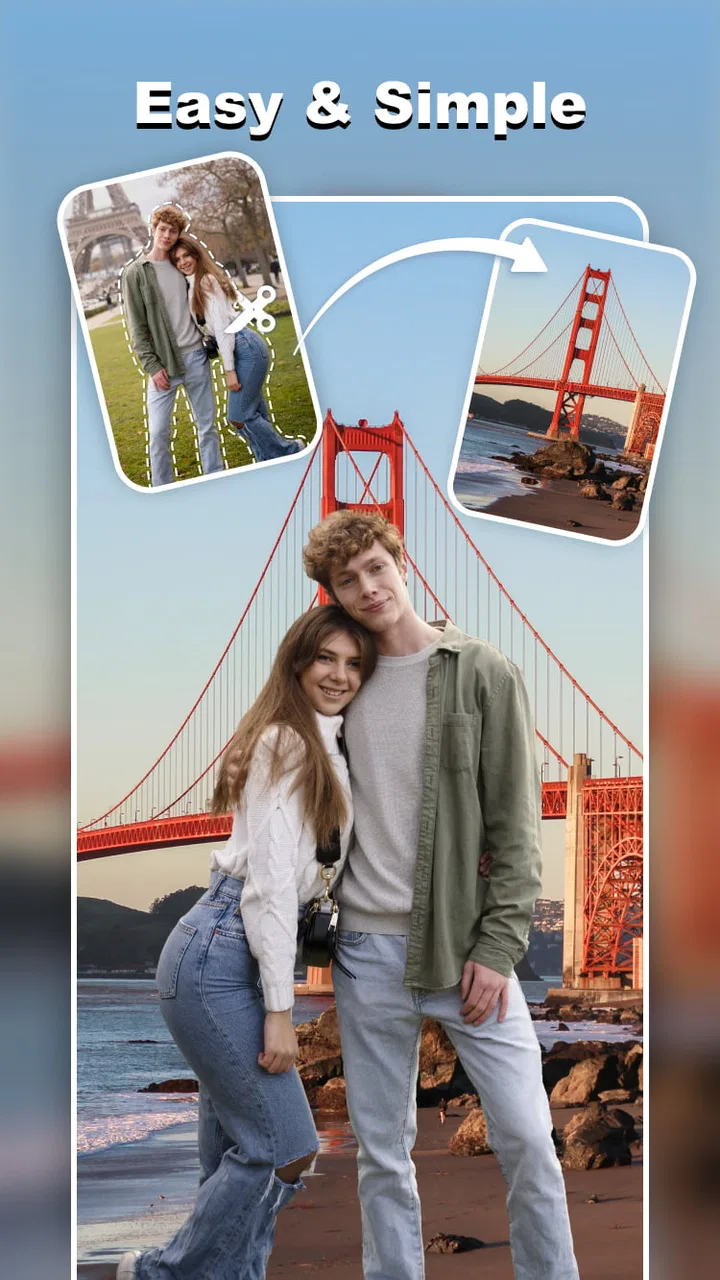
I tried Cut and Paste Photo Editor as a quick, hands-on photography tool rather than as a full replacement for a professional editor. Its appeal is easy to understand: instead of building an image from scratch, I can isolate part of a photo, remove an unwanted area, place one subject into another image, and experiment with playful face swaps. The workflow is aimed at people who want a result quickly, without learning a complicated desktop program.
That focus makes it different from the usual all-purpose photo editors. Many editing apps begin with filters, color controls, or elaborate templates. This one puts the physical act of cutting an object out and combining images much closer to the center. In my experience, that makes it especially interesting for social posts, jokes between friends, simple collages, profile-picture experiments, and small personal projects where the subject matters more than perfect photographic finishing.
How the editor feels in everyday use
The first thing I noticed is that the app is built around a simple visual idea: choose a photo, identify the part worth keeping, and move it into a new composition. That sounds basic, but it changes how I approach editing. I am not spending most of my time searching through menus. I am thinking about edges, scale, placement, and whether the new background makes the cutout look believable.
You May Also Like

 Google Keep - Notes and lists
Google Keep’s Quiet Growth Shows the Appeal of Simpler Notes
As mobile work gets busier, Google Keep keeps winning a simple contest: capture a thought quickly, find it later, and get on with the day.

 Blood Strike: 2.5 Anniversary
Blood Strike’s Loadouts Turn Every Drop Into a Tactical Gamble
A close look at Blood Strike’s custom loadouts: how fast access to signature weapons reshapes its battle royale rhythm, rewards preparation, and narrows the gap between fights.

 Pandora - Music & Podcasts
Pandora’s Music Is Easy to Start, but Harder to Recover
Pandora’s strength is its low-effort path from a seed to a station. Its weak spot is how much confidence it asks you to place in connection, setup, and quiet recovery.

 8 Ball Pool
 Is Built on Rivalries, Rematches, and Routine
A close look at the rivalries, rematches, shared routines, and unanswered safety questions that turn a quick pool match into a persistent mobile community.

 Samsung Music
’s Quiet Strength Is Playing What You Already Own
Its reach comes less from spectacle than from dependable access to a personal library. That simplicity is both the app’s strongest retention engine and its ceiling.

 AccuWeather: Weather Radar
AccuWeather Review: A Quick, Clear Forecast for Everyday Decisions
For everyday plans, the best forecast is the one you can understand quickly. AccuWeather makes rain timing, radar, and local conditions easy to act on, with a few trade-offs.
More From Our News Desk



The cut-and-paste approach is useful when I want to turn a normal snapshot into something more personal. I can imagine using it to place a friend into a holiday scene, create a humorous birthday image, combine separate family photos, or make a quick comparison graphic. It also works for less playful tasks, such as isolating a product from a busy background before placing it on a cleaner one.
The erasing side of the experience is just as important as the cutting. A rough selection can leave fragments around hair, clothing, glasses, or other fine details. I found that the best results come from treating the first pass as a draft rather than expecting a perfect cut immediately. Zooming in, cleaning the border carefully, and checking the image at its final size makes a noticeable difference.
One practical tip is to choose source images with a clear separation between the subject and its surroundings. A person wearing dark clothing against a similarly dark background is harder to isolate than someone standing in front of a contrasting wall. This is not a flaw unique to this app; it is a basic limitation of image masking. Still, the app’s simple purpose means the quality of the original photo has a particularly strong effect on the final result.
Another useful habit is to decide the destination size early. A cutout that looks acceptable in a small social image may reveal rough edges when enlarged. Conversely, spending a long time perfecting tiny details is unnecessary if the finished picture will only be viewed on a phone. I would make the rough composition first, then refine only the areas that remain visible at the intended size.
The face-swap angle adds a more playful layer. It is the kind of feature that can produce an amusing result in seconds, especially with friends or family who understand the joke. At the same time, I would use it thoughtfully. A funny edit depends on consent and context, and a face replacement can look odd when the lighting, head angle, skin tone, or expression differs too much between the source images.
That leads to one of the app’s less obvious strengths: it encourages visual experimentation without demanding a large project. I can test a silly idea, undo it, and try another arrangement rather than committing to a complicated editing session. For casual users, that low barrier may matter more than a long list of advanced controls.
What the free access means in practice
Cut and Paste Photo Editor is free to download and use as an entry point, which makes it easy to test the central workflow before deciding whether it belongs in my regular toolkit. The developer is Daily Joy Studio, and the app sits in the photography category rather than presenting itself as a general design suite.
There are in-app purchases priced from $8.99 to $19.99 per item. I would treat that range as a reason to explore the free experience first, not as an automatic recommendation to buy. The important question is whether the editing tasks I actually want to perform are comfortable with the free access and whether any paid option provides enough extra value for my habits.
For someone who edits only occasionally, paying may not make sense. If I need one funny image for a conversation or a single collage for an event, the free starting point may be enough to decide whether the app solves the immediate problem. A regular creator, however, may value a smoother workflow enough to consider a purchase, provided the available paid functions match the work they do repeatedly.
I would not judge the app solely by the highest possible purchase. A purchase is worthwhile only when it removes a recurring obstacle: repeated editing sessions, a need for more convenient access, or a desire to use the editor as a dependable part of a personal content workflow. If I only open it once every few months, its free availability is the more meaningful part of the value equation.
The app is marked for Teen users, so I would also keep the social context in mind when making face-based edits. That age guidance does not replace good judgment. Images involving real people should be shared carefully, especially when an edit could embarrass someone or be misunderstood outside the original joke.
Where it delivers more value than a standard editor
The strongest value comes from reducing the number of steps between an idea and a rough visual result. In a conventional editor, I might need to find a selection tool, create a mask, copy the subject, open a second image, paste it, resize it, and clean the edges. An app centered on cut-and-paste editing makes that sequence feel more direct.
This is particularly helpful for people who do not want to learn layers and masks in depth. A desktop editor can be more precise, but precision often comes with a steeper learning curve. Here, the trade is clear: I get a friendlier path to a convincing-enough composition, while a professional retoucher would still prefer more detailed control.
Compared with template-driven collage apps, this editor gives me more freedom over the exact subject I want to move. Templates are convenient when I want a ready-made layout, but they can make every result feel similar. Cutting out a person, object, or face lets me build something more specific to the photo and the joke I have in mind.
Compared with a basic background eraser, it also goes beyond simply making a transparent image. The useful step is what happens after the removal: placing the extracted subject somewhere else, adjusting its position, and turning the isolated piece into a complete composition. That makes it better suited to creative combinations than to background removal alone.
One non-obvious use is preparing simple product or marketplace visuals. If I photograph an item on a cluttered table, isolating it and moving it onto a calmer background can make the image easier to understand. I would still check the edges and avoid making the result misleading, but the workflow can be faster than building a full promotional graphic in a design program.
Another is creating a visual “before and after” without relying on a fixed template. I can cut a subject from one image, place it beside another version, and control the spacing myself. This is useful for showing a room change, a hairstyle experiment, a clothing combination, or a small craft project. The freedom is simple, but it can be more useful than decorative filters.
Where the trade-offs become noticeable
The app’s focused design is also its limitation. If I want detailed color correction, precise typography, layered graphic design, advanced retouching, or a carefully managed professional file, I would choose a more complete editor. Cut-and-paste work is its natural territory; asking it to replace every other photography tool would be unfair and probably frustrating.
Edge quality is another important trade-off. Hair, fur, transparent objects, fingers, and thin accessories are difficult subjects for any quick cutout workflow. A result can look excellent around a jacket or a solid object but less convincing around loose strands of hair. I would not use this as my first choice for high-stakes compositing where every border must survive close inspection.
Lighting and perspective can expose a pasted subject even when the outline is clean. If one person is lit from the left and the background suggests light from the right, the edit may look artificial. The same is true when the subject is much sharper or blurrier than the scene behind it. A useful editing habit is to match photos with similar lighting and camera distance before blaming the tool for an unnatural result.
Face swaps have their own technical and social drawbacks. A face may fit the outline but still look wrong because the expression, shadows, or head position do not line up. I would use the feature for clearly playful, consensual images rather than for anything intended to deceive. The more realistic the edit appears, the more important that distinction becomes.
There is also a creative limitation in relying on a quick workflow: I may stop when the image is merely amusing instead of refining it into something polished. That is fine for a private joke, but not ideal for a business image, portfolio piece, or public campaign. The app helps me get to a first result quickly; it does not automatically make that result thoughtful or professional.
Before sharing an image, I recommend checking it at normal viewing size and then zooming into the most important edge. Look at hairlines, fingers, glasses, and any area where the background has a strong pattern. A pasted subject can appear acceptable in the editor but reveal a halo against a bright sky or wall after saving and viewing it elsewhere.
A realistic workflow for a busy day
Imagine I want to make a birthday image for a friend during a lunch break. I have a portrait from one occasion and a funny background from another. I would begin by choosing the portrait with the clearest outline, cut the person out, and remove leftover pieces from the original background. Then I would paste the subject into the new scene and adjust the size until the person’s head and body match the apparent distance of nearby objects.
Next, I would inspect the feet and lower body, because mismatched ground contact is one of the quickest ways to make a composite look pasted on. If the background has a visible floor or horizon, I would align the subject accordingly. I would also compare the brightness of both images. Even a simple adjustment in placement can make the joke feel more intentional.
For a face-swap version, I would select two photos with similar head angles and expressions instead of choosing the funniest images at random. That small decision often matters more than extra editing. I would save the playful version for the intended recipient, make sure the context is obvious, and avoid posting it publicly if the person has not agreed.
For a product image, I would use a plain, contrasting source background, keep the object at a realistic scale, and inspect the outline around handles, corners, or reflective surfaces. I would not use the result to hide damage or alter a product’s important characteristics. The app can help present an item more clearly, but honest representation still depends on the editor.
Who should use it and who should choose something else
I think this is a good match for casual creators who regularly have a specific cutout idea. It suits people making humorous images, simple social graphics, personalized greetings, informal collages, and quick visual comparisons. It is also approachable for users who find traditional layer-based editors intimidating but still want more control than a filter app provides.
It may be especially useful for parents, students, hobby sellers, and group-chat comedians who want to turn ordinary photos into something tailored. The value is not in producing a cinematic composite with no effort. It is in making a personal edit without needing a long tutorial or a desktop setup.
I would skip it if my main goal is professional retouching, detailed poster design, batch processing, or precise color work. I would also look elsewhere if I mostly want automatic enhancements, portrait beautification, or ready-made social templates. Those tasks belong more naturally to other types of photography apps.
It is currently at version 2.1.1 and requires Android 9 or later, so compatibility is worth checking before installing. The app has reached over ten million installs, with a 4.6 average from around one hundred twenty-eight thousand ratings and about one thousand seven hundred reviews. Those figures suggest that the concept has broad appeal, but they do not guarantee that every cutout will suit every photo or that the free experience will fit every editing routine.
Because it is free to start, I see little reason for an occasional user to commit financially before testing a real project. Try a portrait with a clean background, an object with a strong outline, and a face-swap pair with matching angles. Those three tests reveal more about whether the app suits you than browsing feature labels alone.
My buy-or-skip verdict
I would recommend giving Cut and Paste Photo Editor a try if you want a focused way to remove subjects, combine photos, and make playful face-based edits. Its best quality is directness: it turns a specific visual idea into an achievable phone project without forcing me through the complexity of a full editing suite.
I would remain realistic about the finish. Clean source photos, compatible lighting, careful edge cleanup, and sensible scale still matter. The app can make the process easier, but it cannot erase the visual problems created by mismatched images. For professional work, I would move to a more advanced editor after creating the basic cutout here, or skip this app entirely if precision is the priority from the beginning.
On cost, the free starting point makes experimentation straightforward, while the listed in-app purchases from $8.99 to $19.99 per item should be considered only after I know which parts of the workflow I use often. I would pay only if the available purchase clearly saves me time or supports repeated editing; otherwise, occasional users can reasonably keep their expectations focused on the free access.
My final take is simple: choose it for quick, personal photo combinations, not as an all-purpose replacement for serious editing software. For a funny birthday image, a cleaner product snapshot, or a casual face-swap shared with the right people, it can be genuinely handy. If your standard is publication-ready compositing or detailed photographic control, a more advanced alternative will serve you better.
FAQs for Cut and Paste Photo Editor
01What features does Cut and Paste Photo Editor offer?
Cut and Paste Photo Editor provides a range of features, including the ability to cut out sections of a photo and paste them onto another image. It also offers tools for adjusting colors, adding filters, and blending images seamlessly. With user-friendly controls, even beginners can create professional-looking edits.
02Is Cut and Paste Photo Editor user-friendly for beginners?
Yes, Cut and Paste Photo Editor is designed with an intuitive interface that is easy for beginners to navigate. The app includes tutorials and guides to help new users understand its features and capabilities, making the editing process straightforward and enjoyable for everyone.
03Can I use Cut and Paste Photo Editor on both Android and iOS devices?
Cut and Paste Photo Editor is available for both Android and iOS platforms. Users can download it from the Google Play Store for Android devices and the Apple App Store for iOS devices, ensuring a seamless experience across different operating systems.
04Does Cut and Paste Photo Editor support high-resolution images?
Yes, Cut and Paste Photo Editor supports high-resolution images, allowing users to edit and save their photos without compromising on quality. This feature ensures that your edited images remain sharp and clear, suitable for printing or sharing on social media platforms.
05Are there any in-app purchases or subscription fees?
Cut and Paste Photo Editor offers a free version with basic features. However, it also provides premium features through in-app purchases or subscription plans. These may include additional filters, advanced editing tools, and ad-free usage. Users can choose based on their editing needs and budget.
Pros
- Easy to use with intuitive controls.
- Wide variety of editing tools available.
- Quick export to social media platforms.
- Supports high-resolution images.
- Frequent updates with new features.
Cons
- Contains in-app advertisements.
- Limited free features available.
- Occasional crashes reported by users.
- Some tools require in-app purchases.
- UI can be cluttered for beginners.

Cut and Paste Photo Editor
Gallery